You want to Order Marco’s Pizza online tonight and you want it done in under five minutes without confusion, missed deals, or wrong items. This guide covers every ordering method available in 2026 the Marco’s app, the website, third-party platforms, and phone with exact steps, honest cost comparisons, and tips that save you money every time you order. Before placing your order, check our complete Marco’s Pizza menu with prices to plan exactly what you want and find the latest active deals in one place.
Marco’s Pizza online ordering is designed for ease of use, quick to create an order, purchase, and schedule for delivery. Whether you are on your couch in Columbus, Ohio, on your lunch break near the Texas Medical Center in Houston or sitting in your car outside a store in San Antonio, the process is the same, and it takes less time than calling.
Why Ordering Direct Beats Everything Else
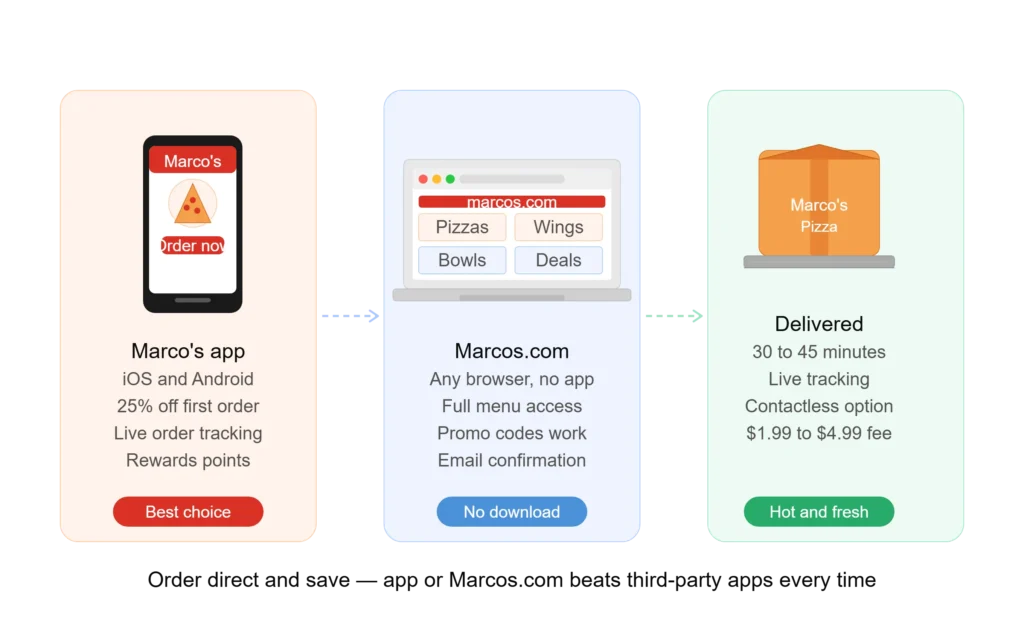
- Before the steps, one thing worth knowing: ordering directly through Marco’s app or Marcos.com is almost always cheaper than using DoorDash, Uber Eats, or Grubhub.
- Ordering Marco’s Pizza through third-party apps is usually more expensive.
- These platforms often charge higher menu prices and service fees, and may not honor Marco’s in-house promo codes.
- For the best pricing and full menu access, order directly from Marco’s.
| Method | Menu Price | Delivery Fee | Promo Codes | Rewards Points |
| Marco’s app (direct) | Standard | $1.99 to $4.99 | Yes, all codes work | Yes, earned on every order |
| Marcos.com (direct) | Standard | $1.99 to $4.99 | Yes, all codes work | Yes, earned on every order |
| DoorDash | Sometimes marked up | $3 to $8 | No Marco’s codes | No points earned |
| Uber Eats | Sometimes marked up | $3 to $8 | No Marco’s codes | No points earned |
| Grubhub | Sometimes marked up | $3 to $8 | No Marco’s codes | No points earned |
The math is clear. Order direct, keep the savings, and earn your Rewards points on every dollar spent.
Method 1: How to Order Marco’s Pizza Online via the App
The Marco’s Pizza app is available on iOS (Apple App Store) and Android (Google Play). It is free to download and the fastest way to order for anyone who orders Marco’s more than once a month.
What the App Includes
The Marco’s Pizza app has an all-new user experience with modern, simplified design for faster navigation and checkout. Easier pizza customization lets you choose crust, sauce, cheese, and toppings with an intuitive interface. The Smarter Deal Builder helps you find, build, and save on the best pizza deals. Visual order tracking follows your pizza from prep to delivery with updated status visuals.
Order Marco’s Pizza Online App
1. Download and open the app
Search “Marco’s Pizza” in the Apple App Store or Google Play. Download and open the app. Create a free account or sign in. Creating an account saves your address, payment method, and past orders for faster checkout every time.
2. Enter your location
The app uses your device location automatically. Confirm your delivery address or enter it manually. The app finds your nearest store and tells you if delivery is available to your address.
3. Choose delivery or carryout
Tap Delivery to have your order brought to your door. Tap Carryout to pick up in store or curbside. Carryout is faster during peak hours and has no delivery fee.
4. Browse and build your order
Tap any item to customize it. For pizza, choose your size, crust type, sauce, cheese amount, and toppings. The app updates the price in real time as you customize. Add everything you want to your cart before moving to checkout.
5. Check the Hot Deals tab before checkout
This step saves money every single time. Always check the Marco’s Pizza Deals tab before checkout to maximize savings. App-exclusive codes and location-specific deals appear here first, before they are posted anywhere publicly.
6. Apply your promo code
On the cart screen, find the Coupon Code field. Enter your code and tap Apply. Confirm the discount appears in your order total before moving forward. Once you confirm payment, the code cannot be applied retroactively.
7. Enter payment and confirm
Order Marco’s Pizza Online accepts credit and debit cards including Visa, MasterCard, and American Express. You can also pay with Marco’s gift cards, Apple Pay, and PayPal at most locations. Enter your payment details and confirm your order.
8. Track your order live
After placing your order, the app shows a visual tracker that updates in real time through these stages: Order Received, Preparing, Baking, Quality Check, Out for Delivery, and Delivered.
Method 2: How to Order Marco’s Pizza Online via the Website
Marco’s official website works on any browser, phone, tablet, or desktop with no app download required. The ordering experience mirrors the app without needing to install anything.
Ordering Through Official Website
- Go to Official Website on any browser. Click Order Now at the top of the page.
- Enter your ZIP code or full delivery address to find your nearest store.
- Choose Delivery or Carryout. If you choose delivery, confirm your address is within the store’s delivery radius.
- Browse the full menu. Click any item to customize. The website pizza builder works identically to the app.
- Go to the Deals tab before adding items to your cart. Many deals are structured so they need to be started from the Deals tab rather than the regular menu to apply correctly.
- Add all items to your cart. In the cart, find the promo code field and enter any active code. Confirm the discount appears before proceeding.
- Complete checkout with your payment method. You will receive an email confirmation with an order number and a tracking link.
- Click the tracking link in your email to follow your order status in the browser without needing the app.
Method 3: Ordering Marco’s Pizza on DoorDash, Uber Eats, or Grubhub
Third-party apps are useful in one specific situation: when you need to confirm whether delivery reaches your exact address and you are not sure if Marco’s delivers there directly. Outside of that, ordering through these platforms costs more and earns nothing toward your Rewards balance.
When Third-Party Makes Sense
Use DoorDash, Uber Eats, or Grubhub if your address is at the edge of Marco’s standard delivery radius and the third-party app shows availability. Use third-party apps only if the Marco’s direct app does not deliver to your area. In all other cases, order directly.
Cost Difference Example
A large Pepperoni Magnifico ordered direct through the Marco’s app at the $12.99 deal price costs $12.99 plus a $2.99 delivery fee: $15.98 total before tip. The same pizza ordered through DoorDash may show at $18.99 plus a $4.99 service fee plus a $3.99 delivery fee: $27.97 before tip. Over a year of regular weekly ordering, that difference adds up to several hundred dollars.
Method 4: Ordering Marco’s Pizza by Phone
Every Marco’s location has a direct phone number listed on the store locator at Marcos.com. Phone ordering works at all locations for customers who prefer it. You will not be able to apply promo codes by phone that are designed for online checkout. Ask the staff member about current in-store promotions when ordering by phone. Phone orders do not earn Rewards points unless you provide your Rewards account phone number at the time of ordering.
Delivery vs Carryout: Which Should You Choose?
This is the most common decision point when ordering Marco’s. The answer depends on three things: your location, your schedule, and whether you have an active promo code.
Choose Delivery When
You are at home and cannot or do not want to leave. Your order is large enough that the delivery fee is a small percentage of the total. A delivery-specific promo code is active that offsets the fee entirely. You are ordering for a group event or family dinner where convenience is worth more than the few dollars saved.
Choose Carryout When
You want to save the delivery fee. You are nearby and can pick up in 15 to 20 minutes. It is a peak hour like Friday evening between 6 PM and 9 PM when delivery queues are longest. Pickup is usually cheaper and can be faster than delivery during peak hours.
Curbside Pickup: The Best of Both Options
Many Marco’s locations offer curbside pickup. You order online, drive to the store, check in through the app or by calling the number listed in your confirmation, and your order is brought to your car. Carryout pricing applies. No delivery fee. No getting out of the car. It is the most underused ordering method at Marco’s and the one that delivers the best value per dollar spent.
How Long Does Marco’s Pizza Delivery Take?
On average, delivery from Marco’s Pizza takes about 30 to 45 minutes. However, delivery time can vary based on factors like time of day, traffic, weather conditions, and how busy your local store is. During lunch hours or non-peak times, your order might arrive faster, while dinner rushes or weekends may result in slightly longer wait times.
Delivery Time by Day and Hour
| Time Window | Expected Wait | Notes |
| Weekday lunch (11 AM to 1 PM) | 20 to 30 minutes | Lightest demand window |
| Weekday afternoon (2 PM to 5 PM) | 25 to 35 minutes | Standard |
| Weekday dinner (5 PM to 8 PM) | 30 to 45 minutes | Moderate demand |
| Friday and Saturday evening (6 PM to 9 PM) | 40 to 60 minutes | Peak hours, longest waits |
| Sunday afternoon (12 PM to 4 PM) | 30 to 40 minutes | Moderate demand |
| Holiday evenings (Christmas Eve, Super Bowl) | 60 minutes or more | Highest demand of the year |
To avoid delays, order early to avoid weekend rushes and use delivery instructions such as apartment gate codes in the delivery notes field.
Marco’s Pizza Delivery Fee and Minimum Order
- Most Marco’s locations charge a flat delivery fee between $1.99 and $4.99.
- Each store sets its own minimum order requirement, usually between $7.99 and $15.00.
- Most stores charge a flat delivery fee, typically between $1.99 and $4.99.
- This does not include tips for the driver.
- Tipping your delivery driver is separate from the delivery fee and is set by you at checkout.
- The standard tip range for pizza delivery is 15 to 20 percent of your order total. During peak hours, tipping slightly above the standard encourages priority handling.
Payment Methods Accepted When You Order Marco’s Pizza Online
| Payment Method | App | Website | In Store |
| Visa and MasterCard | Yes | Yes | Yes |
| American Express | Yes | Yes | Yes |
| Apple Pay | Yes | Yes | No |
| PayPal | Yes | Yes | No |
| Marco’s gift card | Yes | Yes | Yes |
| Cash | No | No | Yes |
| Google Pay | Select locations | Select locations | No |
Gift cards cannot be used on DoorDash, Uber Eats, or Grubhub orders. They are only redeemable through direct Marco’s ordering channels. If your gift card number begins with the number 6, call the dedicated gift card support line at 1-833-480-0148 before attempting to use it online.
How to Save Money Every Time You Order Marco’s Pizza Online
Always Check Hot Deals First
The Hot Deals tab inside your logged-in Rewards account on the app or Marcos.com, shows location-specific deals that are not published anywhere else. Checking it before every order takes 10 seconds and frequently reveals a code that drops the total by $3 to $10.
Use the Right Promo Code
Active codes verified as of October 2026 include MBOGO for the Tuesday BOGO deal (buy one pizza, get one free, online orders only) and M1T899 for a medium 1-topping pizza at $8.99. Enter your code in the Coupon Code field before confirming payment. Note: FBTUES is outdated and no longer works use MBOGO for the Tuesday deal. Codes vary by location and change often, so always check the Hot Deals tab in the app before checkout.
Download the App for First-Order Savings
First-time app users receive 25 percent off their first order automatically after downloading. This discount applies without entering any code and is the single largest one-time saving available at Marco’s.
Order Direct for Rewards Points
Every dollar spent through the Marco’s app or Marcos.com earns one Rewards point. After 50 points, you receive a $5 certificate automatically. Points are not earned on third-party platform orders. Over a year of regular ordering, the difference in Rewards earned between direct and third-party ordering is meaningful.
Schedule Ahead for Group Orders
Save your favorite orders in the app for one-click reordering. Schedule orders ahead for parties or game nights. Scheduling avoids the peak-hour wait and lets you plan exactly when your order arrives useful for family dinners, sports events, or office lunches.
Contactless Delivery and Special Instructions
Marco’s Pizza offers contactless delivery options.
- During checkout, you can request this by entering specific instructions in the delivery instructions section, such as “leave at the doorstep” or “ring bell and step back.” This is especially useful for safety and convenience during illness, inclement weather, or for apartment buildings.
- Use the delivery instructions field to include apartment numbers, building access codes, gate codes, or any detail that helps the driver find you without delays.
- Missing this step is one of the most common causes of delayed or failed deliveries.
What to Do When Something Goes Wrong
Even with a well-run system, problems happen. Here is how to handle the most common ones.
Cold or Incorrect Pizza
If you receive cold pizza, ask for a credit or partial refund. If an item is missing, always check the box before the driver leaves. Contact the store directly using the phone number in your order confirmation. For unresolved issues, email sliceofsupport@marcos.com or call Marco’s customer support at 1-833-509-0285.
Promo Code Not Working
If your promo code is not working, make sure you are ordering directly from Marco’s, not through a third-party app. Also confirm that your cart matches the deal’s item requirements, that the deal is active in your location, and that the code has not expired. Location-specific codes do not work at every store.
Order Showing Wrong Date
A known app issue reported in Apple App Store reviews involves the scheduled order date defaulting to the next day instead of the current day when ASAP ordering is unavailable. Double-check the scheduled date on the order confirmation screen before submitting payment, especially for same-day orders placed late in the evening.
Ordering Marco’s Pizza for Large Groups and Events
How Far in Advance Should You Order?
Catering orders must be placed at least 24 hours in advance by calling your nearest store directly. For a Christmas Eve gathering, that means calling no later than December 23. Standard online orders for groups of fewer than ten people can be placed the same day without advance notice.
How Many Pizzas Do You Need?
Each large pizza (14 inches, 8 slices) feeds three adults at approximately three slices per person. Use this table to plan:
| Group Size | Large Pizzas Needed | Estimated Cost |
| 5 to 8 people | 2 to 3 pizzas | $28 to $66 |
| 10 to 12 people | 3 to 4 pizzas | $42 to $88 |
| 15 to 20 people | 5 to 7 pizzas | $70 to $154 |
Best Bundle for Medium Groups
For groups of five to eight people, the Game Day Feast at $39.99 includes a large specialty pizza, a large 1-topping pizza, and 10 wings. It is the most efficient bundle on the menu for this group size without placing a full catering order.
What to Add as Sides
Add Cheezy Bread, Cinna Squares, and wings alongside your pizzas to complete a group spread without significantly increasing the per-person cost.
Conclusion
Order Marco’s Pizza online in 2026 is fastest through the app, most flexible through the website, and most expensive through third-party platforms. Download the Marco’s app, create a free account, check the Hot Deals tab before every order, apply any active promo code before you confirm payment, and earn Rewards points on every direct order. Those four habits alone will save you meaningful money across a full year of ordering.
For group orders, contactless delivery, or scheduled meals, the same direct ordering process applies with a few extra steps in the delivery instructions and cart fields. The entire system is built to be ordered in under five minutes once you know where everything is.